

Your LinkedIn profile is a magnet for opportunity. And you are an expert in your own field — so why not claim your authority, advocate for yourself (and your business), and GROW?
According to LinkedIn, there are approximately 1 billion accounts on the platform, and most resources claim that only about 1 percent of those accounts are active. Therefore, is the space crowded? Not really. Is the outdoor space — specifically the archery/bowhunting space — crowded? Absolutely not.
Why should you focus on LinkedIn? Inc. magazine wrote a story earlier in 2025 called “3 Reasons LinkedIn Will Be the Social Platform of 2025”. The article summarized that due to its evolution into a powerful platform for B2B influence and thought leadership, its emerging role as a content and video platform for storytelling and insights, and its ability to foster a professional environment where valuable connections lead to real-world business impact, it is the place to be for business owners.
Antidotally, the outdoor industry is tired of being kicked out by Meta, Google and TikTok. LinkedIn is the one platform that hasn’t degraded us, demeaned us or demoted our content. We can speak from our own personal profiles, from a company profile, or from both!
Optimizing Your Profile
The profile — or headline — is the first impression. This needs to be in the strongest voice and provide the best information about you and your brand. To do that, ask, “Why are you using LinkedIn?” Answers might include growing your personal brand, expanding your professional network, and/or making strategic connections. Or is it to sign on new clients or business, or a pivot or job change? Whatever it is, you want to showcase that in your LinkedIn headline.
A good template for a headline is:
YOUR STRONGEST TRAIT/HOOK/CATCHPHRASE or SLOGAN | WHAT SEPARATES YOU FROM OTHERS | AUTHORITY | WHAT YOU ARE SEEKING OR PERSONAL BLURB
Breaking it down:
Your strongest trait is also known as your lean-in statement. Do you have a signature slogan or catchphrase?
What separates you from others – these are your keywords, SEO optimized. Consider the formula “I help X do Y without Z.” Example: “I help new archers build confidence and accuracy without the intimidation of walking into a pro shop unprepared.” Or “I help bowhunters find their perfect setup without the guesswork and expensive mistakes.”
Authority — this is your social proof or your unique value proposition. Insert competitions won, awards received, or what separates your shop from others.
Seeking — Are you a speaker? Podcaster? Seeking more clients or work? Add that here.
Let’s add all this together for an archery shop owner with these three examples:
Option 1: 25 Years Behind the Bowstring | The Only Shop That Guarantees Your First Arrow Hits the Target | Certified Master Archery Instructor | Helping Beginners Fall in Love with Precision
Option 2: From Couch to Competition in 90 Days | Personal Fitting Process Others Skip | USA Archery Level 4 Coach | Building Iowa's Next Generation of Archers
Option 3: Bullseye or Your Money Back | Custom Tuning While You Wait, Not While You're Gone | 3x State Championship Coach | Turning Curiosity into Championship Form
Each option begins with a bold promise or unique selling point, highlights a specific differentiator that sets the shop apart from its competitors, establishes credibility through certifications or achievements, and concludes with a personal mission or goal that demonstrates passion for the sport and community building.
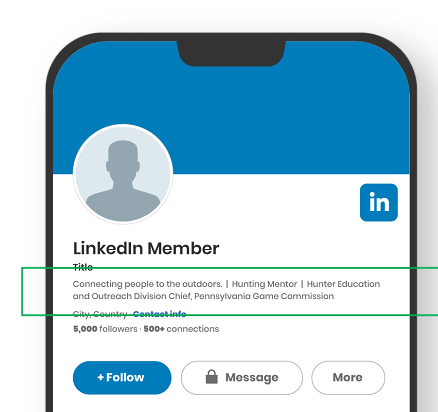
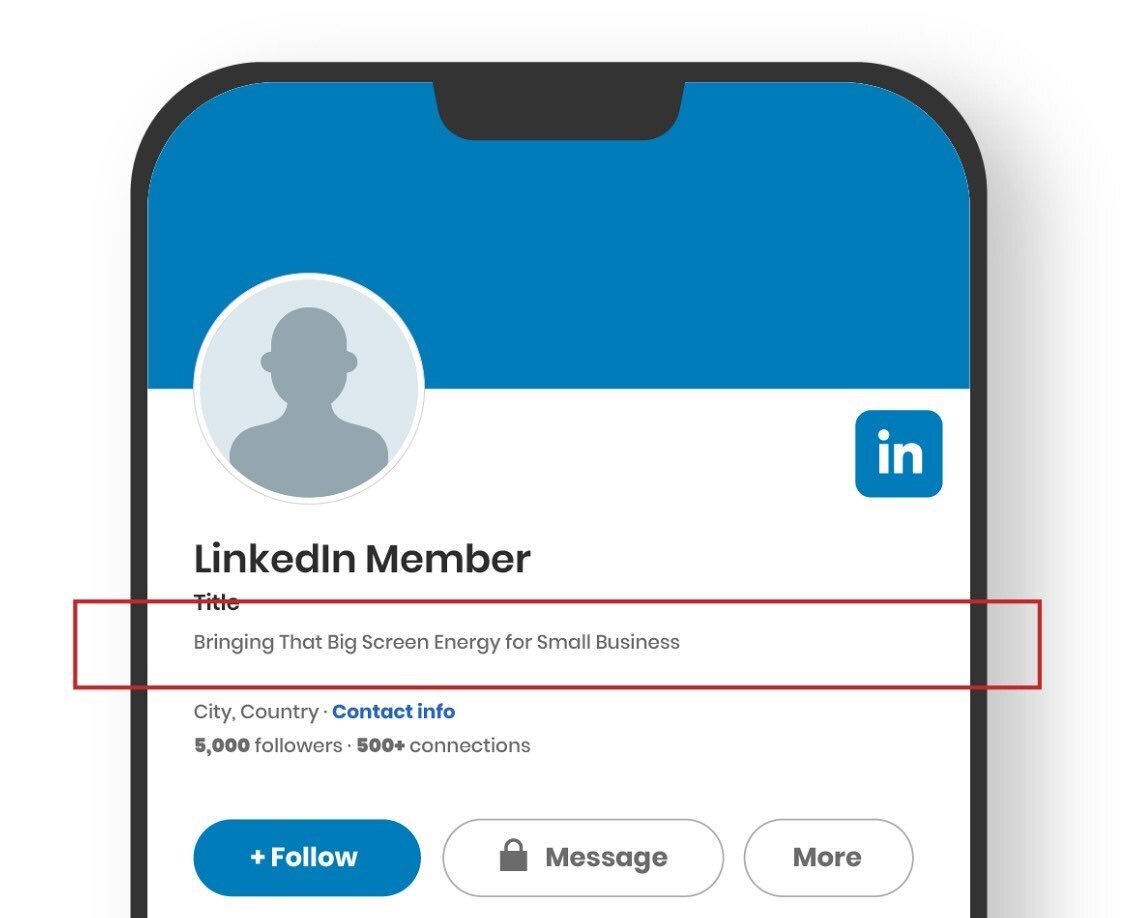
Of course, there are several poor examples of headlines on LinkedIn. Mostly, they leave you wondering what these people do – and that is something you never want a potential customer to experience.
Shown below are two real-life examples, one good and one bad.
Creating LinkedIn Content
Consider the following formulas:
Content ≠ $
Content = Trust
Trust = Easier Chat
Chats = $
Posting on LinkedIn isn’t just about creating new posts constantly, although that is helpful. Spewing out content day in/out isn’t going to bring money to the door, but it will generate trust – and we can build on trust. And with trust, it will (hopefully) bring money.
A good formula for creating content for LinkedIn is to keep it to storytelling:
1: Personal Experience + Transformation = Storytelling
What growing up on a farm taught you about running a business today; How losing that job was the best thing for your brand.
2: Client or Customer Experience + Process + Transformation = Storytelling
How a customer came to you with X problem and with the process of Y (that you specialize in!), you were able to transform into Z; How a client’s challenge almost stumped you, but then this happened…
Example: The dad who walked into my shop last Tuesday was ready to give up on archery.
His 12-year-old daughter had been begging to try it after watching the movie Brave for the 100th time. But after three frustrating trips to big box stores, she was missing every shot and getting discouraged.
"The guys at the other places just handed us a bow and pointed to the targets," he told me.
"She's ready to quit, and honestly, so am I."
Here's what we did differently: (List out in bullets or short sentences and follow up with the results and call to action.)
3: Industry Insights, Perspectives, Updates = Educating.
What the tariffs mean for the archery small business owner, How to avoid rising costs; How you got more customers in the door by doing X.
All of the above formulas can end with a call-to-action of “work with me if you also have the same challenges,” or “DM me if you are interested in learning more about my process.”
Coming Up With the Hook
The hook, or the first sentence or first few words, is the magnet. It cannot be “Google-able.” If it were, everyone would stop reading. Why should they hear you out?
Good hooks start with:
- Ask a question to spark curiosity
- Start with a common issue, or pain point, your customers face
- Be controversial (ex., I tell 30% of customers NOT to buy from me, here’s why)
- Show an eye-catching visual (a broken bow or string and tell the story of what happened and how it could have been avoided)
More hook examples to get you started:
Problem/Pain Point Hooks:
- "Three things every archery shop gets wrong (and why it's costing you accuracy)"
- "The $200 mistake I see new bowhunters make every season"
- "Your form looks perfect, so why are you still missing left?"
Controversial/Contrarian Hooks:
- "Expensive bows don't make you a better archer. Here's what does:"
- "Stop buying arrows online. Seriously."
Story/Curiosity Hooks:
- "A 75-year-old grandma just outshot three college athletes in my shop"
- "The weirdest request I've gotten in 25 years of archery retail"
- "This one adjustment added 40 yards to a customer's effective range"
After the hook, you must set the stage with the rest of the story. Explain where you were/where the customer was, what the challenge or opportunity was, the steps you took, and the results or takeaways – just like in the dad/daughter example post above.
Putting It Altogether and Starting Out
If you are new to LinkedIn, it is always good to do an “Introduction Post.” And you can do this quarterly or annually!
1. “Welcome”
2. Now using LinkedIn (or why you are introducing yourself again)
3. Where you were
4. What you’re currently doing
5. Future prospecting [What you’re excited about]
6. Goal for being active on the platform
7. Your Ask (if you have a newsletter, or CTA, this is an excellent time to drop it in!)
Other Options on LinkedIn
If creating content is a bit much right now, there are other ways to show your authority on LinkedIn:
- Respond to other people’s posts. Now, LinkedIn shows impressions on your comments on others’ posts!
- Write articles or create your own newsletter – this is a great CTA for your profile.
- Make videos for LinkedIn (or repurpose the ones created for Instagram/Facebook/YouTube Shorts)
LinkedIn started a “Create Video” newsletter with tips, tricks and hacks for creating short videos. It is the same formula as stated above for creating written posts, only keep it short and sweet (less than two minutes). Video can also be expanded to include explainer videos, behind-the-scenes footage of your business, and staff interviews (explaining why people should work for or with you). For company pages, choose a “champion” for the company to create videos on the company’s behalf.
If you are still struggling with post ideas, try AI. In fact, all the formulas provided above can be cut/paste into AI and then add who you are, what you do/specialize in and what you want to focus.
Example prompt for any AI tool:
“I am a manager/owner/you-fill-in at a local archery business storefront in XYZ city. I work with bowhunters and archery enthusiasts from competitive professionals who practice daily or weekly, to weekend warriors who might only pick up a bow a few times a year. I want to create a series of videos (or posts), to help my ideal audience, showcase my store’s services, and lead to referrals or inquiries for classes/business. Come up with 10 video (or post) ideas that I can execute easily and are effective for LinkedIn.”
Be careful of using AI beyond being a tool to help you create ideas for discussion —in other words, don’t use it to write the script for the video or the post content. LinkedIn is about human-to-human connection, having a conversation with people. And frankly, we are getting smarter at detecting whether a post was written by AI.
Exploring LinkedIn Premium
LinkedIn offers a Premium version for Career (job seekers) and Business (the rest of us.) They also offer an option with Sales Navigator Core included, to help further with sales prospecting, developing custom leads, and searches. For this use case, we are reviewing Premium Business.
Under Premium Business, you can use it for your own profile OR your company page. Although the Company Page option is not available to all pages yet, according to LinkedIn. Only a few of my client’s pages have the option to upgrade, and those who do have the option haven’t found a need to do so.
One of the biggest pros for Premium Business for your own profile is to see who viewed your profile, along with robust analytics. It is a tad odd to see who is stalking your profile, but it is interesting to see the name, industry and position of the person doing so. LinkedIn states Premium Business users get 13 times more profile views, on average. This is great, but that also means it is up to how well you constructed your profile and other sections to further connect with that person.
Other features worth mentioning in Premium Business for profiles is that it gives a custom button to your profile, which is perfect for your CTA, it allows you to highlight key information at the top of your profile, and it includes a dynamic cover photo to help you stand out. “Dynamic” here means you can add up to four “slides” to your cover image. No more static images for LinkedIn – you can truly tell a story now.
LinkedIn offers a free trial for Premium, and then prices vary after that.
LinkedIn Premium can be a valuable tool, but it’s not a necessity for success. What truly matters is how you leverage the platform itself, regardless of whether you’re using the free version or Premium. By optimizing your profile, creating authentic and engaging content, and actively participating in conversations, you can carve out a space for yourself and your business.
LinkedIn is a platform of opportunity, especially for professionals in niche industries like ours. It’s a place where you can showcase your expertise, build trust, and connect with like-minded individuals who share your passion. Whether you’re sharing stories, educating your audience, or simply engaging with others, every interaction strengthens your network and influence.

Sidebar: Dos and Don’ts When Creating Posts for LinkedIn
Do:
- Ensure the content is read at a third-grade level. You can use AI to help with this by adding your written post to AI and asking it to tell you what grade level it is, and suggestions of how to adjust it.
- Use short, simple sentences with white space. One sentence per line is great.
- Engage on LinkedIn at least 2-3 times a week. Leave at least 5 comments on posts every time you engage. And make at least one of those engaged days dropping an original post.
- Use the message feature!
Don’t
- You don’t always need a photo to go with the post, but it is helpful
- Spam others posts with poorly written comments. Be thoughtful in responses. Add something to the party.
- Post and ghost. Many people only use LinkedIn when they are seeking a new job, or clients. Keep a steady LinkedIn diet and you’ll be amazed at how your network and influence will grow!
- Ignore people who connect with you. Accept the connections, if they are valid, and message them back thanking them for reaching out and ask how you can be helpful.